Settings
Telegram and WhatsApp
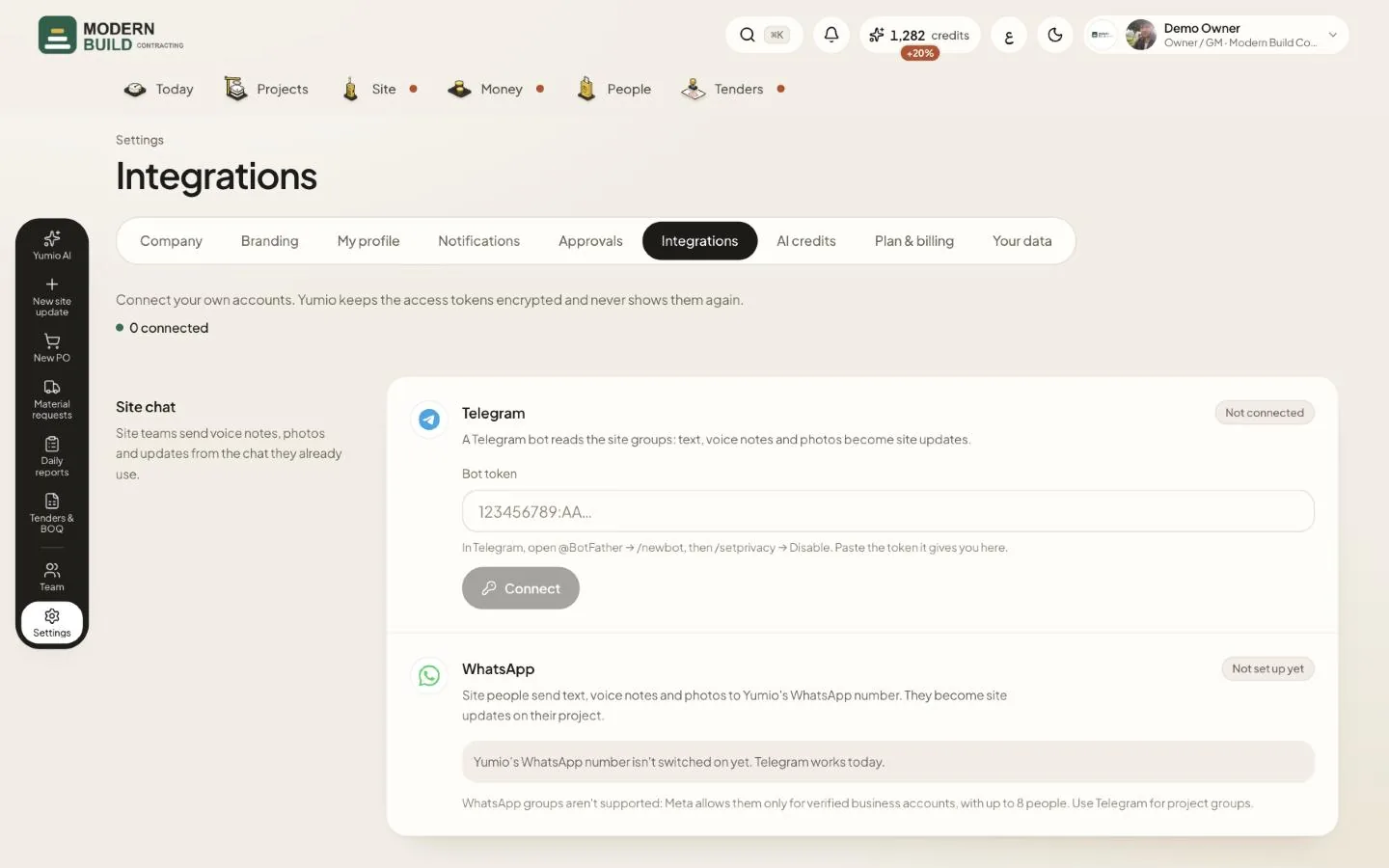
Site teams send text, voice notes and photos from the chat they already use, and Yumio turns them into site updates. You set it up in Settings → Integrations → Site chat. The owner or a project manager links the groups.
Step by step
- 1Open Integrations and find Site chat. With Yumio's shared bot there is nothing to set up; a company can also connect its own bot.
- 2Under Link a site group, pick the project and press Make link. Open the link on a phone with Telegram and choose the site group, or send the `/link` command shown into the group.
- 3Under Link my Telegram, press Make link and open it on your phone so the bot knows who you are. Each link works once, for 7 days.
- 4Link the rest of the team from Team: Telegram link on each person, or Invite a site person by phone for people who don't sign in.
- 5For WhatsApp, people message Yumio's number shown on the WhatsApp card. Each person adds their mobile with the country code under My profile and verifies it from that phone (Add my phone).
What you see on the screen
- 6Ready or Not set up yet on the WhatsApp card says whether Yumio's number is ready for your company.
- 7N connected at the top shows how many of these connections are working.
More in this section: Settings
Still stuck?
Write to us in Arabic or English and we will help.